


Galaxy Z Flip 8 Expands Cover Screen App Support to Around 50 Apps, but the Experience Still Isn’t Perfect
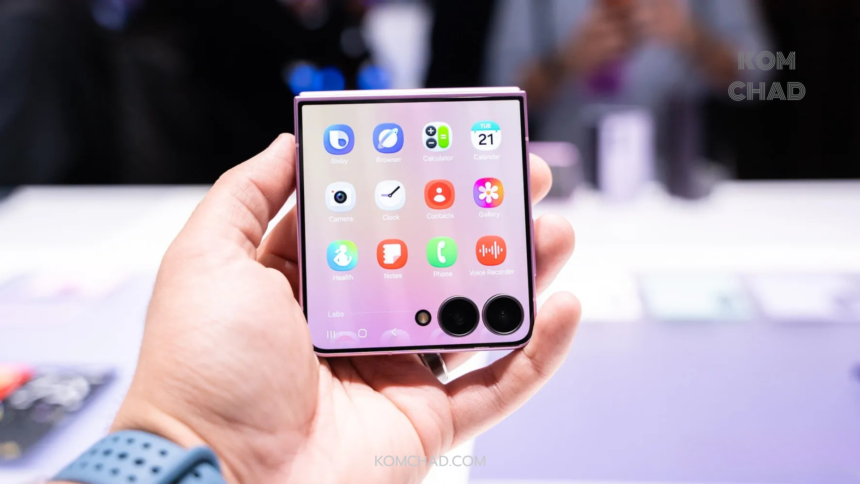
Samsung has significantly upgraded the FlexWindow on the Galaxy Z Flip 8, allowing the external display to run far more applications than previous generations. Earlier Galaxy Z Flip models were often criticized for featuring a large cover screen that supported only a limited selection of apps, preventing users from taking full advantage of the hardware.
- FlexWindow Gets a New Home Screen
- Now Nudge Needs to Deliver Relevant Information
- A Dedicated App Drawer Finally Arrives
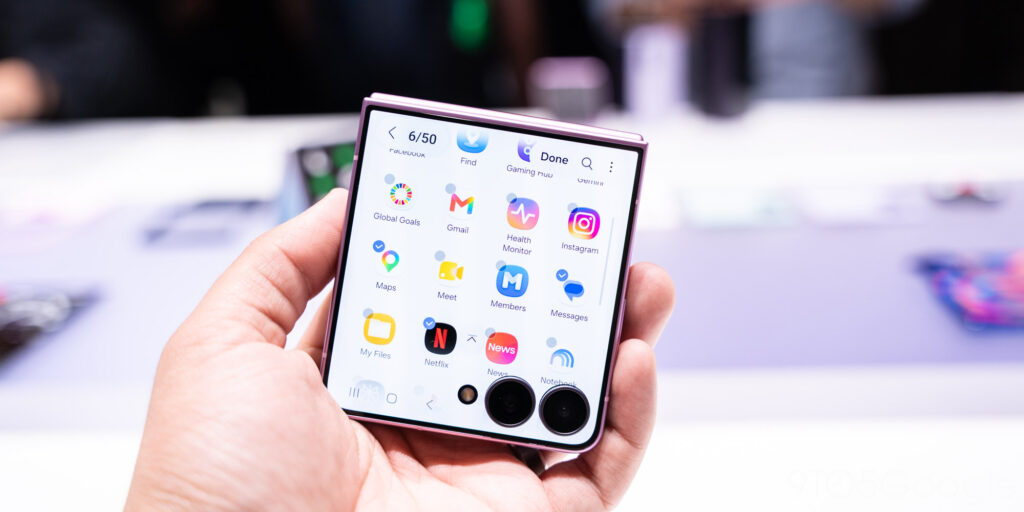
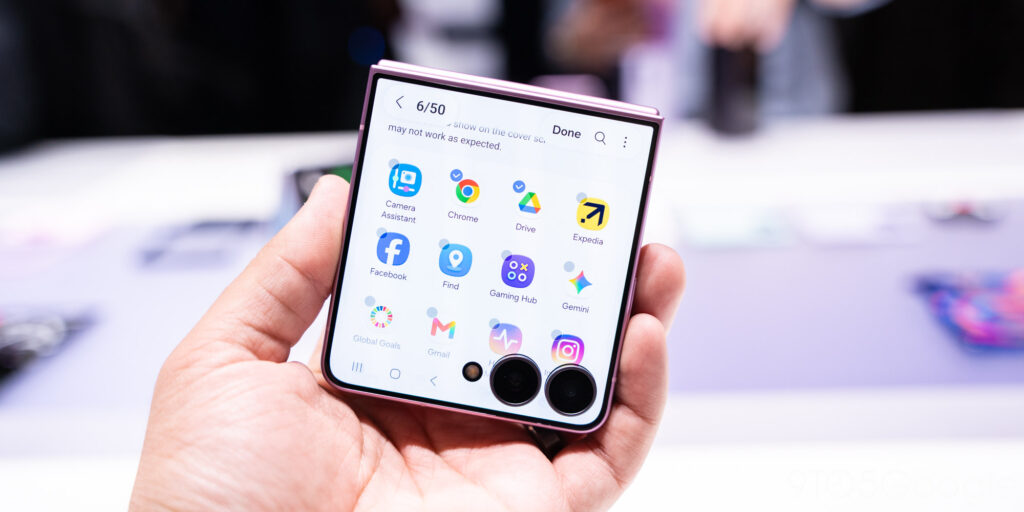
- Labs Now Supports Around 50 Apps
- Not Every App Was Designed for a Small Cover Screen
- Gemini Still Isn’t Fully Optimized
- The New Recents Page Makes App Switching Easier
- Still Behind Some Competitors
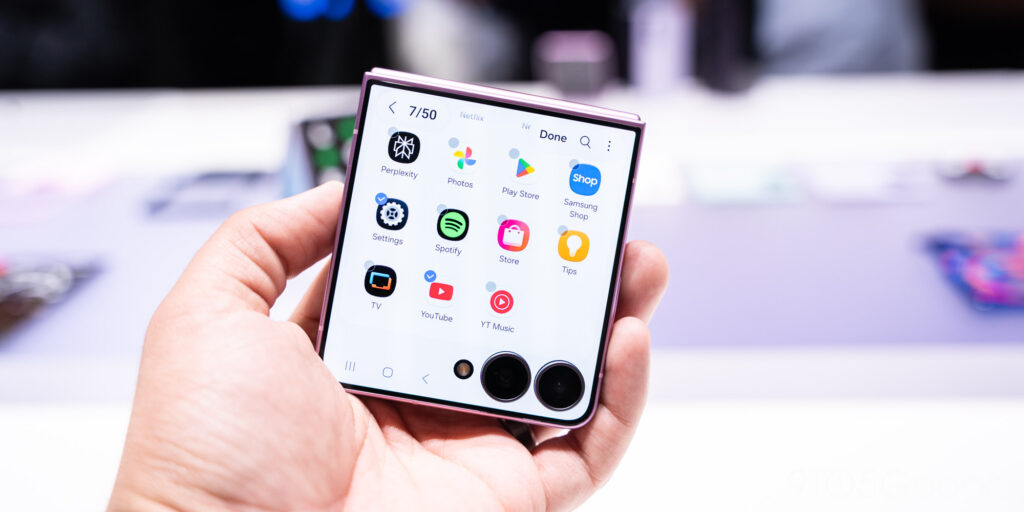
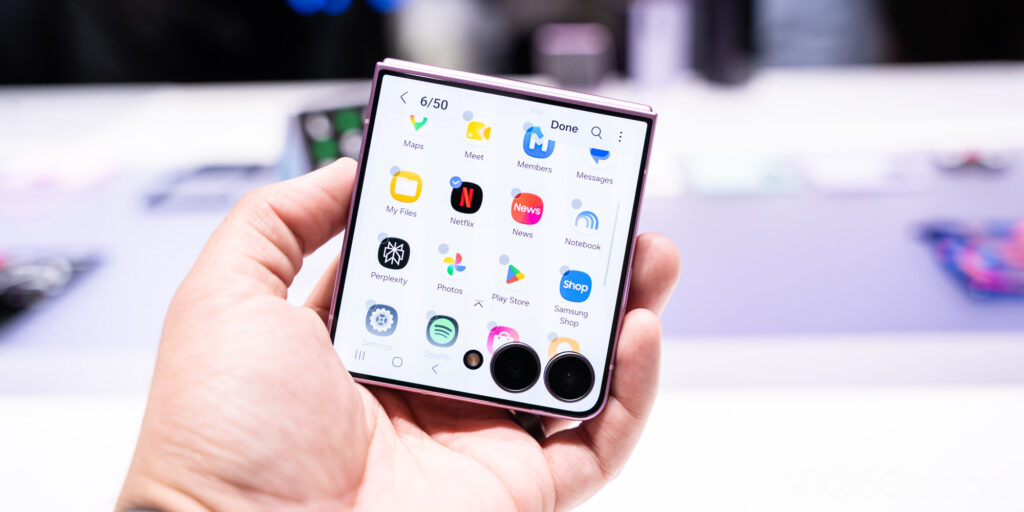
The latest software introduces a dedicated App Drawer for supported Samsung apps while expanding the Labs feature to include approximately 50 compatible applications, including YouTube and Google Messages.
Samsung has also added a Recents page, enabling users to quickly switch back to recently opened apps without navigating through multiple menus. However, early testing indicates that some applications still do not function flawlessly. Gemini, in particular, suffers from usability issues, including repeated keyboard pop-ups and an inability to accept prompts consistently.
FlexWindow Gets a New Home Screen
The Galaxy Z Flip 8 features a redesigned home screen for the FlexWindow, making the cover display more useful for everyday tasks.
The updated interface supports customizable panels and a wider variety of widgets, giving users greater flexibility in organizing information on the external screen.
At the center of the experience is a contextual widget similar to Google’s At a Glance, displaying calendar appointments alongside Now Nudge recommendations tailored to the user’s current context.
Read More
This redesign transforms the cover screen into a convenient information hub, allowing users to check important updates without unfolding the device.
Now Nudge Needs to Deliver Relevant Information
Samsung’s contextual recommendation system is most valuable when it provides information users genuinely need at the right moment, such as travel details, upcoming appointments, reminders, or daily tasks.
If the system frequently surfaces irrelevant suggestions or excessive notifications, many users are likely to disable the feature and rely on traditional widgets instead.
For Now Nudge to succeed, Samsung must continue improving its ability to understand user behavior while maintaining strong privacy protections and avoiding unnecessary collection of personal data.
A Dedicated App Drawer Finally Arrives
One of the most significant usability improvements is the addition of a full App Drawer for supported Samsung applications on the FlexWindow.
Instead of relying on widgets or hidden menus, users can now browse compatible apps through an interface that closely resembles the primary Android app drawer.
The addition reflects Samsung’s recognition that users increasingly expect the cover screen to do more than display notifications, tell the time, or control media playback. Many users want to launch and use real applications directly from the external display.
Labs Now Supports Around 50 Apps
Samsung has expanded its Labs section to allow roughly 50 third-party applications to run on the FlexWindow.
The list now includes popular apps such as YouTube, Google Messages, and many other widely used Android applications, representing a substantial improvement over previous Galaxy Z Flip models.
However, the Labs branding indicates that the experience remains experimental. Users may still encounter small interface elements, improperly scaled layouts, or features that do not function correctly on the compact cover display.
Not Every App Was Designed for a Small Cover Screen
Most Android applications were originally built for full-sized smartphone displays rather than compact external screens.
As a result, running these apps on the FlexWindow can produce tiny buttons, cramped layouts, and text that is difficult to read.
Developers will ultimately need to implement Adaptive Layouts or dedicated Cover Screen interfaces to ensure applications remain comfortable and safe to use on smaller displays.
Samsung can allow applications to launch on the cover screen, but it cannot guarantee an optimal experience unless developers also optimize their software.
Gemini Still Isn’t Fully Optimized
According to testing by 9to5Google, Gemini currently experiences several issues on the Galaxy Z Flip 8’s cover screen.
The application repeatedly triggers the keyboard and sometimes prevents users from entering prompts normally.
The problem is particularly notable because Samsung and Google have positioned Gemini Intelligence as one of the flagship AI experiences on the Galaxy Z Flip 8.
If users still need to unfold the phone every time they want to use AI, the practical value of the FlexWindow is significantly reduced—especially for quick tasks such as summarizing messages, replying to chats, or searching for information.
Although these issues can likely be resolved through future software updates, Samsung would ideally ensure that one of its headline features works reliably before broader product availability.
The New Recents Page Makes App Switching Easier
The Galaxy Z Flip 8 introduces a dedicated Recents page for the FlexWindow, allowing users to reopen recently used apps without returning to the App Drawer each time.
This enhancement improves everyday multitasking, particularly when switching between apps such as Google Messages, Google Maps, music streaming services, and the camera.
To provide a seamless foldable experience, Samsung must also ensure that applications maintain their state while transitioning from the cover screen to the main display. Ideally, unfolding the phone should allow users to continue exactly where they left off without reloading the app or losing ongoing work.
Still Behind Some Competitors
Despite the significant improvements, Samsung is still catching up to several competitors in the foldable smartphone market.
Foldable devices from Motorola and other Android manufacturers have supported a much broader range of cover screen applications across multiple generations.
Samsung previously chose a more controlled approach in an effort to maintain software quality, but those restrictions also prevented the FlexWindow from reaching its full potential.
Expanding compatibility to around 50 applications is an important milestone, yet it still falls short of providing unrestricted access to virtually every Android app.
With the Galaxy Z Flip 8 launching in the United States at a starting price of $1,199, buyers have every reason to expect both displays to deliver a complete flagship experience. While Samsung has made meaningful progress, additional software refinement will be necessary before the FlexWindow can truly match the flexibility offered by some competing foldable devices.